
In this article, I will not discuss IFS Cloud's business functionality. Instead, I'll share what we learned on the technical side: configurations, reports, interfaces, modifications, workflows, APIs and deployment lifecycle.
One of my clients chose IFS Cloud as part of an ERP migration project. The environment now runs version 25R2 and, at this client, I lead the applications team.
CRIMUnderstanding CRIM
One of the first technical terms encountered on an IFS project is CRIM:
Configuration
Low-code adaptations, pages, fields, entities, projections and BPA.
Reports
Quick Reports, Business Reporter, document outputs and operational reporting.
Interfaces
REST/OData API, middleware, flat files and IFS Connect.
Modifications
Developer Studio, Marble, PL/SQL, builds and Deliveries.
This classification seems simple, but the same need can involve several technical objects. Adding a field, for example, may require a configured attribute, a page configuration, and possibly a validation workflow. A CRIM therefore does not always correspond to a single technical object.
CC as Configuration
A configuration is an adaptation made without directly modifying the IFS standard code. A significant portion of this work can be done from IFS Cloud Web.
Fields, entities, pages and projections
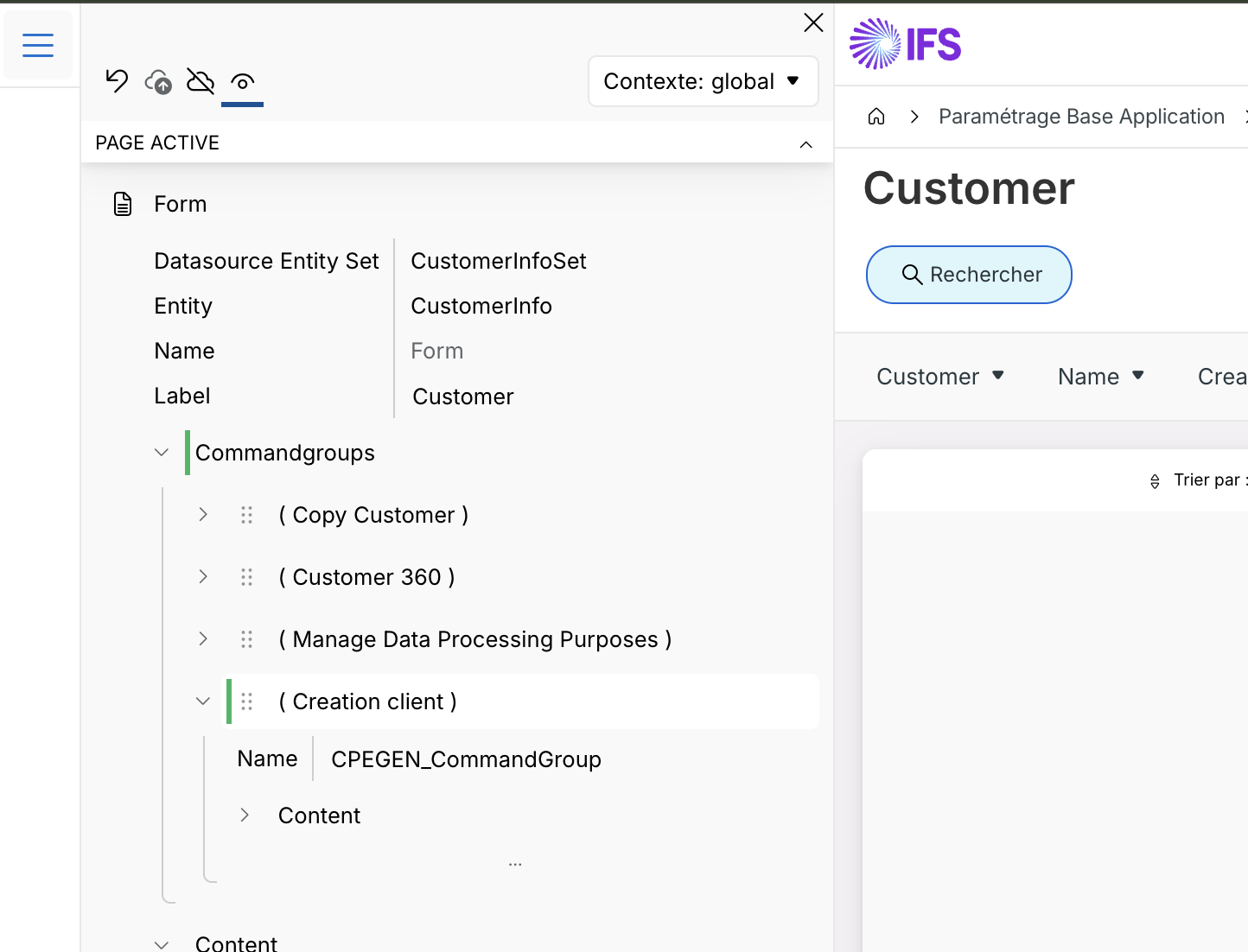
It is possible to add custom attributes, create custom entities, configure pages or extend certain projections. However, we must avoid a common shortcut: an entity is not simply a table and a projection is not simply a SQL view.
An entity represents a data model object and can rely on multiple database objects. A projection exposes part of the functional domain as a REST service. It contains entity sets, but also actions, functions, structures, enumerations, and other controls.
When a configuration is published, IFS can generate the necessary database objects, refresh the metadata, and make the new items accessible in the affected projections.
For a developer used to directly exploring the tables of an RDBMS, getting started can be confusing. The model is documented through entities, projections, system information and API Explorer, but it does not always appear as a classic relational diagram.
BPAs and workflows
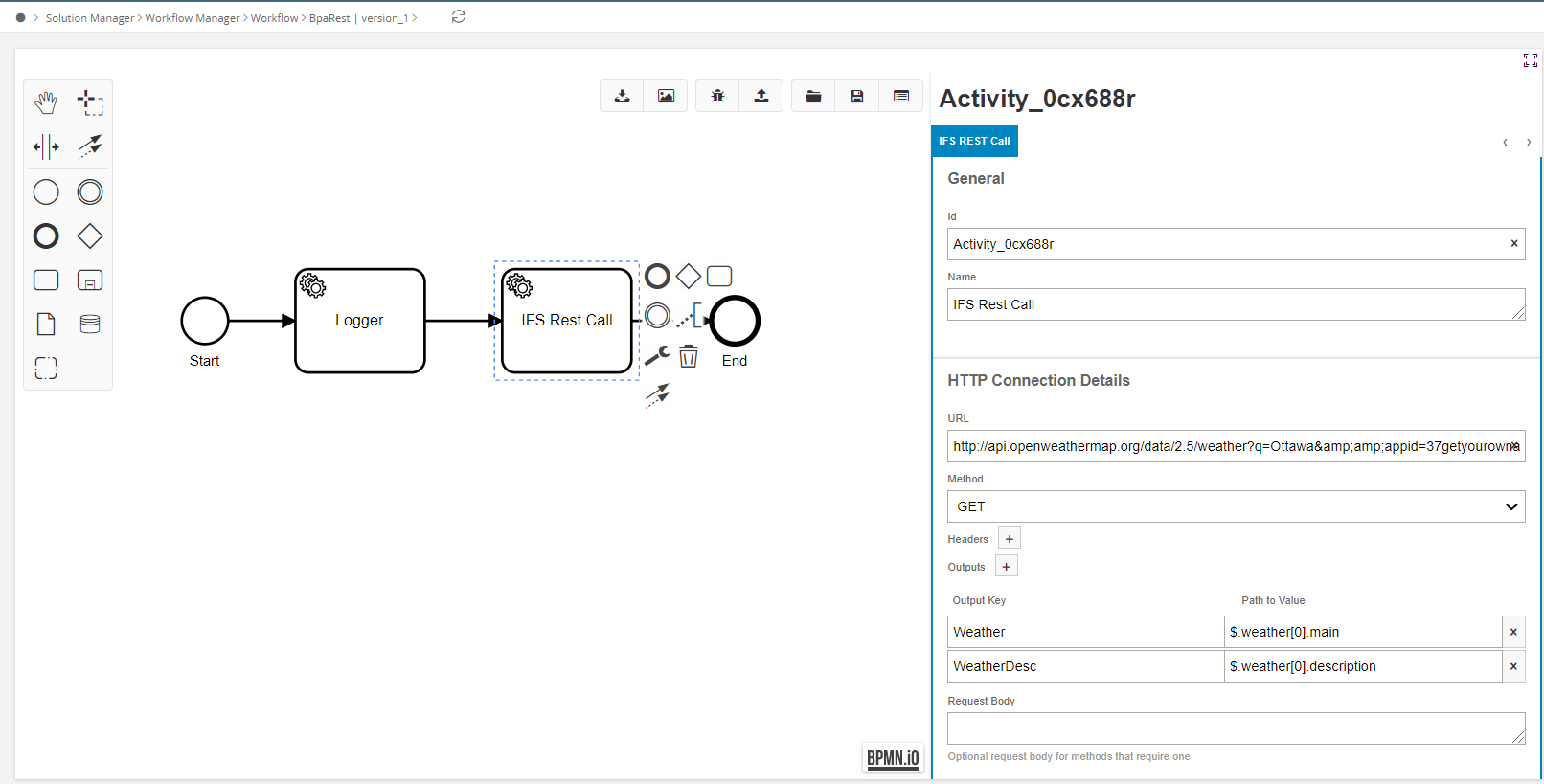
Business Process Automations, or BPA, are based on a workflow designer inspired by BPMN. They allow you to add logic around the operations carried out in IFS Cloud without immediately customizing the standard code.
There are three main families in particular:
- Validation: control an operation and prevent its validation when a rule is not respected;
- Process Enrichment: enrich or modify the values transmitted during processing;
- User Interaction: Request additional information from the user during the process.
BPAs are a real strength of IFS Cloud, but they do not replace a general programming language. The capabilities have clear boundaries and it is sometimes necessary to rethink the need to stay within the scope of the configuration.
Lobbies
Lobbies are personalized portals that provide an overview of a process, a role or a set of indicators. Users generally like them because they avoid going through multiple screens to find important information.
Lobbies support page parameters. These parameters can be stored in the user's profile or transmitted in a navigation URL. On the other hand, the proposed controls do not always offer the full functionality of a business list of values. A user may therefore need to know a company, site or project code.
Best practice is to limit the number of parameters, use relevant default values and, when possible, build links that directly open the Lobby with the correct context.
RR like Reports
The term report covers several families of tools in IFS Cloud. It is important to distinguish between quick reports, operational reports and more advanced analysis tools.
Quick Reports
Quick Reports meet a need for ad hoc reporting. For a simple table, it is possible to use an SQL query or Query Designer, then export the result to Excel.
They are effective for quickly producing a list, but the parameters can become unusable when you multiply the filters. Default values can help, but you should avoid turning a quick report into a full application.
For more advanced Excel needs, IFS now recommends Business Reporter. The old Excel plugin used for operational reporting has been deprecated for several versions and should not be confused with Business Reporter.
Document outputs and operational reports
Documents such as invoices, orders or delivery notes fall under operational reporting. IFS Cloud now offers two native tools: IFS Report Designer, installed on a workstation, and IFS Report Studio – Designer, accessible from the Web.
When our project began in 23R2, the experience with the available tool did not meet our expectations for stability and productivity. We have therefore chosen a complementary solution, Ootary, for selected document outputs and advanced screens.
This observation is time-specific: the native offer has evolved since the start of the project, in particular with Report Studio. A third-party solution can unblock a requirement, but it also introduces a new environment, a new language, specific skills and an additional dependency.
II as Interfaces
In our context, exchanges between IFS Cloud and other applications mainly pass through the Blueway middleware.
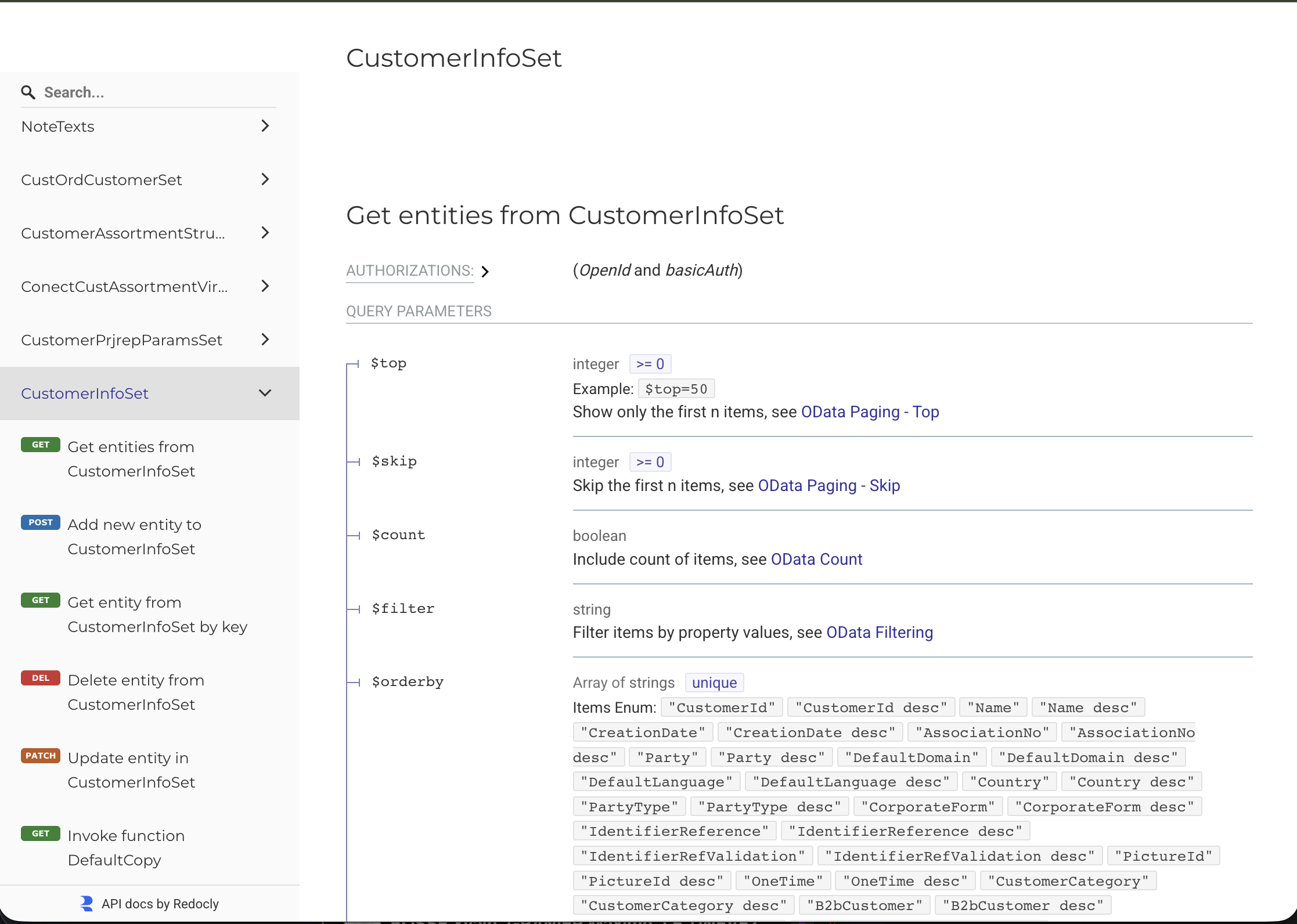
The openness of IFS Cloud is one of its main strengths. API Explorer lists the available OData projections and services, with their entity sets and documentation. Calls rely on classic HTTP methods and JSON exchanges.
Finding the right API
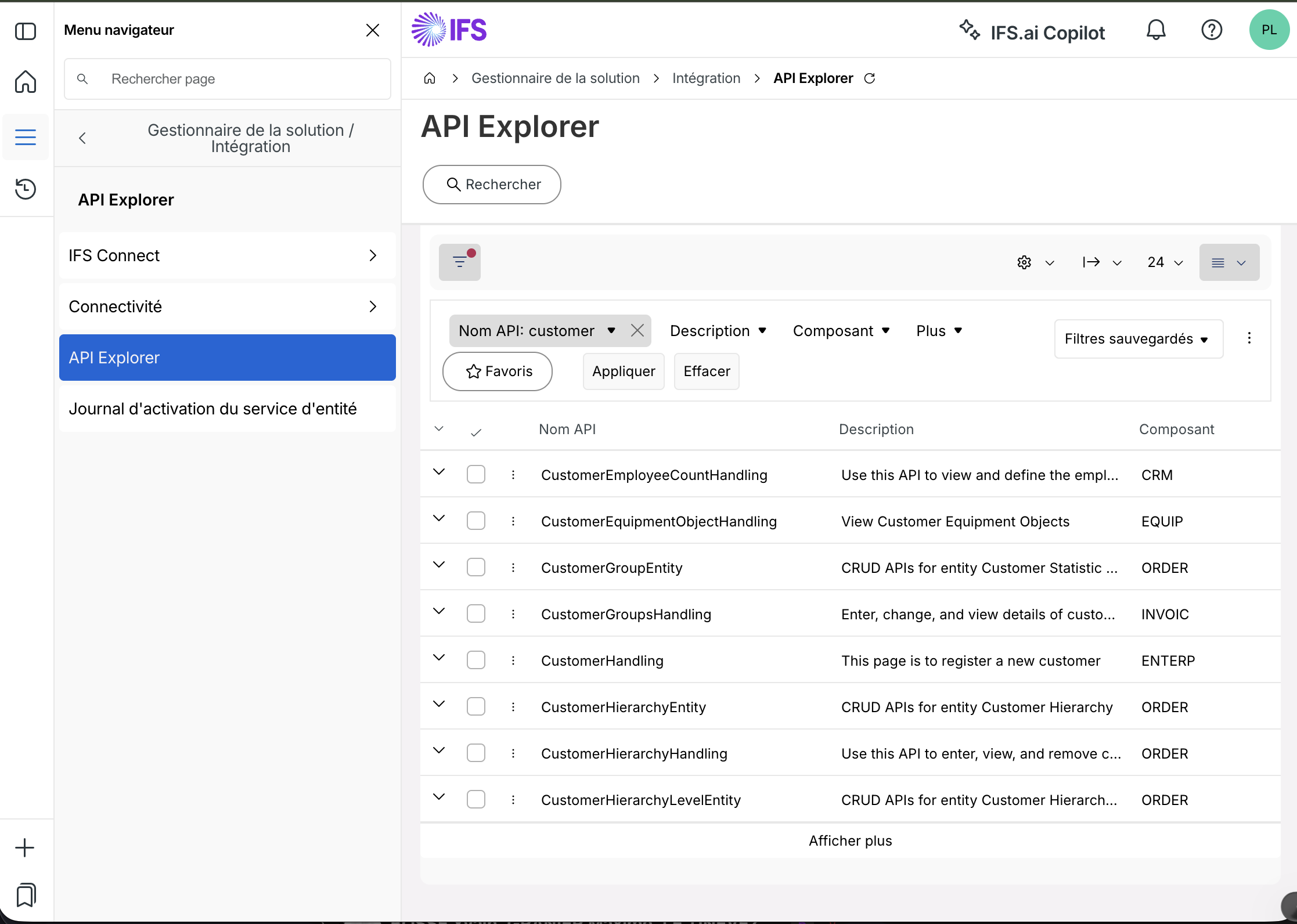
A practical method is to open the relevant screen, activate the IFS development tools and observe the network calls. It is then possible to directly open the corresponding projection in API Explorer.
This method allows you to quickly understand what the interface does, but the API used by a page is not necessarily the best API for system-to-system integration. IFS distinguishes in particular between Premium APIs, integration APIs, standard APIs and Entity Service APIs. The choice should depend on the use case, expected stability and level of support.
IFS Connect
When the integration relies on messages, files or more traditional protocols, IFS Connect acts as an integration broker. It supports different connectors, including HTTP/HTTPS, FTP/SFTP, Mail and JMS, with transformation mechanisms.
It therefore remains entirely possible to manage flat files when the target system does not provide an API. It works, although this approach generally requires more monitoring, error handling, and naming conventions.
MM for Modifications
Modifications are the area in which I have the least hands-on experience. They come into play when the configuration tools are no longer sufficient and it becomes necessary to extend the internal functioning of IFS Cloud.
In the IFS documentation, this approach is called an in-the-core extension, or customization. It is carried out with IFS Developer Studio and can use IFS models, Marble for the client, PL/SQL for server logic and, in certain cases, Java.
Custom development must be implemented in the customization layer, without directly modifying the standard files. Development is carried out with IFS Developer Studio and can use PL/SQL for server-side logic, as well as Marble for the IFS Cloud Web screens.
The Git, Sanity Build and Delivery cycle
The delivery process for a change is much more structured than a simple configuration performed through the UI. In our project, the standard process is as follows:
- 1 create a new branch in the Customer Solution Git repository;
- 2 implement the change and run the first tests in the Build Place development environment;
- 3 commit and push the changes to the repository;
- 4 create a merge request, review the code, then merge the branch into the main branch;
- 5 run a Sanity Build on the relevant commit;
- 6 fix any generation, database deployment or compilation errors until the build reaches
san-OKstatus; - 7 create a Delivery from Build Place;
- 8 test the Delivery in the designated environments;
- 9 request its deployment in the environments of Use Place, in the correct order: test environment, staging or UAT, then production.
The Sanity Build doesn't just check that the files are present. In particular, it controls the generation of the database code, its deployment and the compilation of the solution. When successful, a Sanity image is produced and the commit is tagged san-OK. This step is essential before preparing a reliable delivery.
I am not going to pretend to master this whole part: I know the process and the delivery stages, but the most substantial customizations today remain mainly carried out by our integrator.
ACPTransport configurations with ACP
Configurations made directly in IFS Cloud must be organized and transported from one environment to another. IFS provides Application Configuration Packages, or ACPs, for this purpose.
An ACP can contain several types of configuration objects: attributes, pages, configured projections, workflows, events, or other supported elements.
An important point: a configuration object can only belong to one ACP at a time. Additionally, removing an object from a source package does not automatically remove it from the target environment during a subsequent import.
BDRStart BDRs as early as possible
I end with a piece of advice that concerns the project more than the development: have users work on the BDRs as soon as possible.
In IFS vocabulary, BDRs correspond to Basic Data Requirements, the configuration data necessary for the operation of processes. This includes, for example, tax codes, payment terms, accounting groups, statuses, locations and many other reference datasets.
WEBA community resource that has helped us enormously
During the project, DSJ’s Blog helped us enormously. The official IFS documentation remains essential, but it is very broad and sometimes describes more the possibilities of the platform than the concrete way of solving a problem encountered in practice.
DSJ, by contrast, publishes directly usable examples, with practical cases around workflows, REST calls, authentication, integrations, troubleshooting and reports. Several times, his articles allowed us to quickly understand a mechanism that we had difficulty reconstructing solely from the documentation.
In our experience, this blog has often been more useful to us than the IFS forum. The forum contains a lot of interesting information, but specific technical questions can go unanswered for a long time. A detailed article, accompanied by a complete and reproducible example, then provides much more value than a discussion thread interrupted after the initial question.
A big thank you to the author of DSJ’s Blog for sharing this knowledge. In an ecosystem as vast as IFS Cloud, this type of independent resource allows project teams to save considerable time.
✓Key takeaways from IFS Cloud
IFS Cloud is a powerful and particularly open platform. Its ability to create configurations, automate processes and expose APIs makes integration projects much easier.
This power comes with a vocabulary, a development model and a lifecycle that takes time to learn. You must learn to choose between configuration, report, interface and modification, but also accept that a seemingly simple need can involve several components.
Our team learned many of these concepts directly during the project. This article certainly still contains simplifications. Feedback and corrections are therefore welcome in the comments.
As I write these lines, I am also participating in the IFS France User Group, which is an excellent opportunity to compare our experience with that of other customers.
↗Official sources
- IFS Cloud – Tailoring Overview
- IFS Cloud – Build Place and Use Place
- IFS Cloud – Projections and customer model
- IFS Cloud – API Explorer
- IFS Cloud – Business Process Automation
- IFS Cloud – Application Configuration Packages
- IFS Cloud – Customer Solution Development and Git repositories
- IFS Cloud – Sanity Builds
- IFS Cloud – Build Place Deliveries
- DSJ’s Blog – Technical articles dedicated to IFS

Comments
0 commentsNo published comments yet. Be the first to respond.