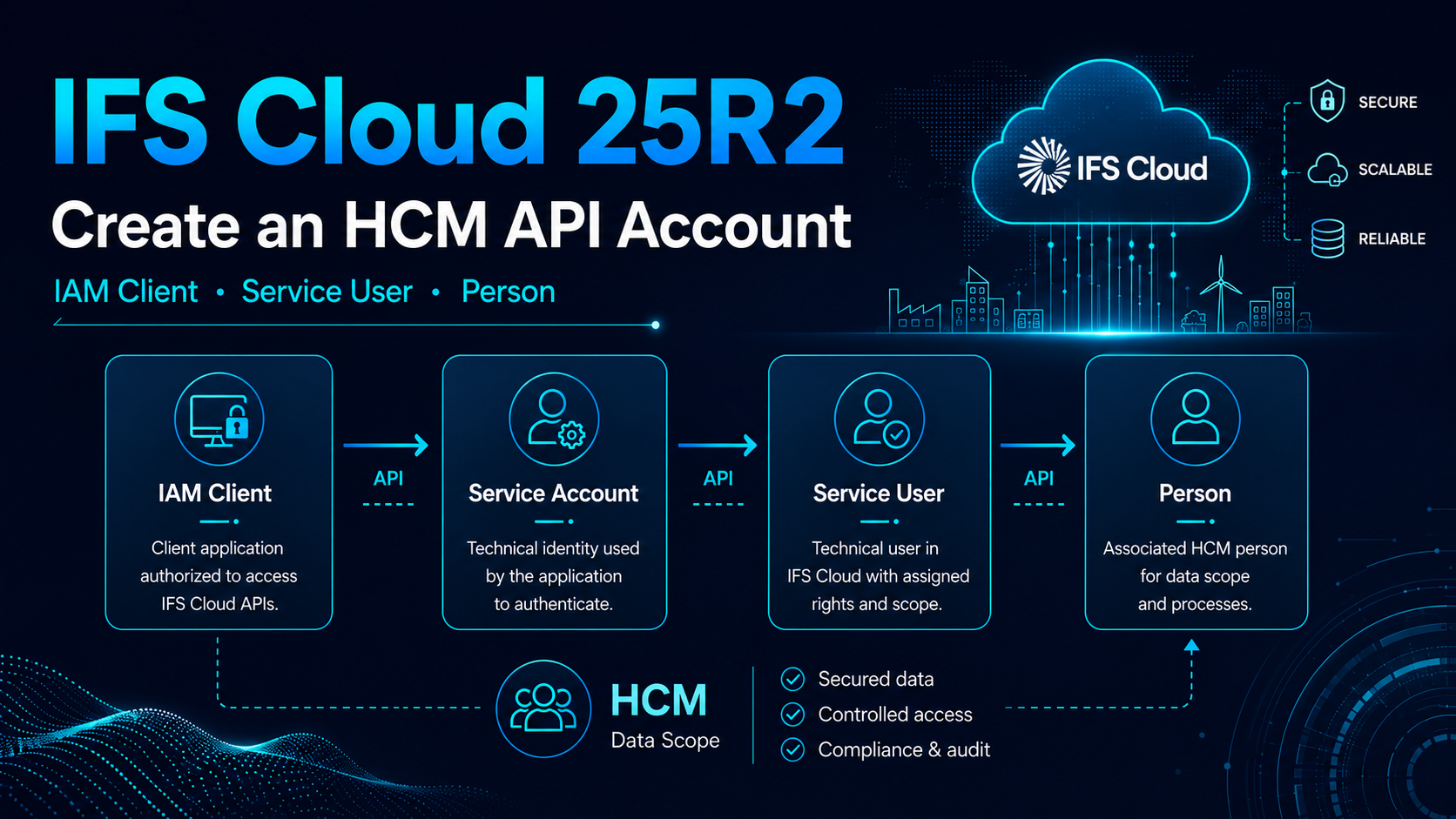
Creating an OAuth2 technical account in IFS Cloud appears straightforward: generate a Client ID and Client Secret, assign a few Permission Sets, and the integration should be ready. In practice, as soon as that account must access HCM data, several identity layers overlap: IAM Client, Service Account, IFS Service User and Person. After a refresh of our UAT environment, this chain had become inconsistent and IFS rejected the account before it even evaluated its permissions. This is the configuration that ultimately worked in my IFS Cloud 25R2 environment.
Login.FUSRNULL looks like a missing permission, but the failure occurs earlier in the chain.
A field report, not a universal rule
This article describes a configuration actually used in an IFS Cloud 25R2 environment. Screen labels, navigation paths and HCM mechanisms may vary depending on the release, installed components, administrative roles and customisations. A Person is not mandatory for every integration: it became necessary in my case because the account had to be authorised for a specific HCM data scope.
01The real issue: several identity chains
My requirement was conventional: create a technical account that a middleware platform could use, obtain a Client ID and Client Secret, request a token through the OAuth2 Client Credentials flow, and then call the IFS REST APIs required by the HCM module.
The trap is assuming that one “API account” object carries all these responsibilities. IFS actually separates several layers:
External application
        │
        ▼
IAM Client
        │
        ▼
IAM Service Account
        │
        ▼
IFS Service User
        │
        ├── Companies
        ├── Permission Sets
        │
        ▼
Person
        │
        ▼
HCM data scope
Each layer answers a different question:
- Who requests the token? The IAM Client.
- Which technical identity carries the token? The IAM Service Account.
- Which IFS user executes the calls? The IFS Service User.
- Which functions and projections are authorised? The Permission Sets.
- Which Companies and HR data are visible? Company access and the HCM scope associated with the Person.
The sentence to remember
IAM Client ≠ Service Account ≠ IFS Service User ≠ Person. They may have similar names, but they are neither the same object nor the same authorisation layer.
02Why the UAT refresh made the situation more difficult
In my case, the problem appeared after the UAT environment was refreshed from production. The API account previously existed in UAT, but it did not exist in the production environment used as the source of the clone.
After the refresh, some components were still present or had been partially recreated, while the links between IAM and the IFS users were no longer consistent.
IAM Client present
+
IFS user present or partially recreated
+
Directory ID missing, incorrect or linked to the wrong object
=
token or application login impossible
The API returned an error wrapped in a generic code such as DB_ACCESS_ERROR, with the following detail:
ORA-20105: Login.FUSRNULL:
The directory id SERVICE-ACCOUNT-... is not allowed to run the application.
The first instinct is often to add more Permission Sets. In this specific case, that achieves nothing: IFS has not yet reached the stage where functional permissions are evaluated. It cannot correctly resolve the IAM identity to the IFS application user.
Do not be misled by the top-level error
The general message may look like a database or authorisation issue. The Login.FUSRNULL detail indicates that the investigation should begin with the identity chain: Service Account User, Directory ID and IFS Service User.
03The four objects that must be distinguished
| Object | Role | What it does not replace |
|---|---|---|
| IAM Client | Represents the external application requesting an OAuth2 token. | By itself, it does not carry Companies, Permission Sets or the HCM scope. |
| IAM Service Account | The technical identity created when Service Accounts are enabled on the client. | It does not replace the application user displayed on the Users page. |
| IFS Service User | The application user to which Permission Sets, Companies and IFS authorisations are assigned. | It does not automatically provide a Client ID and Client Secret. |
| Person | The Person object used by some HCM data and organisational access controls. | It does not replace the IFS user or its Permission Sets. |
04The trap created by the two setup wizards
IFS provides two creation paths, each of which appears almost sufficient on its own.
Path A: start from Users
From the IFS user page, you can create a user of type Service User and associate a Person with it. This is useful for HCM, but it does not automatically create the IAM Client, Client ID and Client Secret.
Path B: allow IAM to create the user
From IAM Clients, the automatic creation option can generate the associated Service User. This is convenient for many conventional integrations, but in my environment the generated user did not have the Person required for the HCM scope.
Creation from Users
→ IFS Service User + Person
→ no Client ID / Client Secret

Automatic creation from IAM Client
→ IAM Client + Service Account + IFS Service User
→ no Person in my case
The chosen method is therefore to deliberately separate the two operations:
The method that worked
First create the IAM Client without automatically creating the Service User, retrieve the exact Service Account User value, and then manually create the IFS Service User with its Person. The technical link is made through the Directory ID.
05The target architecture that works
IAM Client: IFS_BLUEWAY
        │
        ├── Client ID
        ├── Client Secret
        └── Service Accounts = Yes
        │
        ▼
IAM Service Account
service-account-ifs_blueway
        │
        │ value copied into Directory ID
        ▼
IFS Service User: IFS_BLUEWAY
        │
        ├── User Type = Service User
        ├── Companies
        ├── Permission Sets
        └── Create Person = Yes
        │
        ▼
Person: IFS_BLUEWAY
        │
        ▼
HCM Organization Access
Copy the exact value
Do not reconstruct the Directory ID from the client name. Copy the actual value created by IAM without changing the hyphens, prefix or letter case displayed in your environment.
06Step 1: create the IAM Client
In IFS Cloud 25R2, open:
Solution Manager
→ Users and Permissions
→ Identity and Access Manager
→ IAM Clients
Create a client dedicated to the integration, for example:
IFS_BLUEWAYFor a server-to-server scenario, the configuration used in my case is as follows:
| Interface setting | Value | Reason |
|---|---|---|
Enabled |
Yes | The client must be active. |
Public Client |
No | The middleware is a confidential client capable of protecting a secret. |
Service Accounts |
Yes | Enables the technical identity used with Client Credentials. |
Create IFS Service User |
No | Allows the Service User and its Person to be created manually afterwards. |
IFS then creates a service-account identity similar to:
service-account-ifs_bluewayKeep three pieces of information: the Client ID, the Client Secret and the exact Service Account User value.
The Client Secret is a production secret
Do not include it in a screenshot, ticket, log, version-controlled configuration file or shared Postman collection. Store it in a secret vault or in the secure mechanism provided by your middleware.
07Step 2: create the IFS Service User and its Person
Then open:
Solution Manager
→ Users and Permissions
→ Users
Manually create the technical user. Example:
Identity      : IFS_BLUEWAY
User Type     : Service User
Directory ID  : service-account-ifs_blueway
Create Person : Yes
The essential field is Directory ID. It must contain the exact Service Account User value created by the IAM Client.
The IFS Identity name can remain readable for administrators, but the Directory ID is what creates the technical link:
OAuth2 token
     │
     ▼
IAM Service Account
     │
     │ resolution through Directory ID
     ▼
IFS Service User
     │
     ▼
Authorised permissions and data
Also verify that the user is active, is allowed to run the application and has the Service User type.
08Why HCM may require a Person
A middleware platform is obviously not a physical person. However, in IFS, some HCM authorisation mechanisms rely on the Person object and its link to an organisational scope.
Two different controls must therefore be distinguished:
| Control | Question it answers | Example |
|---|---|---|
| Functional permission | What can this user call? | Access to a REST projection or an IFS function. |
| HCM data authorisation | Which data can the user read or act upon? | Accessible organisational scope, employees or units. |
An account may therefore have the required Permission Sets and still receive an error or an empty result for some HCM data if the associated Person does not have the correct scope.
09Step 3: assign Companies
Depending on the configuration, company access is managed, among other places, from:
Accounting Rules
→ User Related Data
→ Users per Company
Add the technical account to every Company whose data the middleware needs to read or process. Do not automatically grant all Companies: retain the principle of least privilege.
10Step 4: assign Permission Sets
Next, assign the Permission Sets required by the REST projections and functions actually used by the middleware.
A Permission Set does not mean unlimited HCM access
Permission Sets enable functions and projections. HCM controls may still filter data according to the Person, organisation, Company and business context.
For clean troubleshooting, begin with the minimum set of Permission Sets required for a test projection, and then add rights by feature. Immediately assigning a very broad profile hides the real problem and increases the security risk.
11Step 5: assign the HCM scope
The organisational structure is available, among other places, from:
Human Capital Management
→ HCM Services
→ Organization Management
→ Graphical Organization Structure
Check the scope that the technical account's Person must be able to access. The correct setting depends on the requirement: the entire organisation, selected units or a more restricted scope.
The complete chain then becomes:
IAM Client
     │
     ▼
IAM Service Account
     │
     ▼
IFS Service User
     ├── Companies
     ├── Permission Sets
     │
     ▼
Person
     │
     ▼
HCM Organization Access12Test OAuth2 and the API one layer at a time
Once the configuration is complete, the middleware can use the OAuth2 Client Credentials flow.
Client ID + Client Secret
          │
          ▼
IFS OAuth2 endpoint
          │
          ▼
Access Token
          │
          ▼
Authorization: Bearer <token>
          │
          ▼
IFS REST projection
To avoid mixing several failures together, test in this order:
- Obtain a token with the Client ID and Client Secret.
- Call a simple projection requiring few permissions.
- Test Company access on non-HCM data.
- Test the target HCM projection.
- Compare the expected result with the Person's scope.
Generic example to adapt with the actual OAuth2 endpoint of your environment:
curl -X POST "<IFS_TOKEN_ENDPOINT>" \
  -H "Content-Type: application/x-www-form-urlencoded" \
  -d "grant_type=client_credentials" \
  -d "client_id=<CLIENT_ID>" \
  -d "client_secret=<CLIENT_SECRET>"
Do not log the complete command
In an operational script, the secret should come from a protected variable or vault. Also prevent it from appearing in the shell history.
13Error troubleshooting matrix
The following table is a practical troubleshooting method, not an exhaustive official list of IFS errors.
| Symptom | Layer to check first | Useful checks |
|---|---|---|
| The token is not issued | IAM Client and OAuth2 | Active client, valid secret, authorised grant, correct endpoint and environment. |
Login.FUSRNULL or unauthorised Directory ID |
IAM-to-IFS User link | Exact Service Account User, Directory ID, active user, Service User type and duplicates. |
| Valid token but 401/403 response on a projection | Permission Sets and projection | Projection rights, targeted IFS user and activation of the Permission Set. |
| The API responds but some Companies are missing | Users per Company | Companies assigned to the account and expected Company context. |
| The HCM API returns little or no data | Person and HCM scope | Person created, user-to-Person link, organisation and HCM authorisations. |
| The account worked before a refresh | Cross-environment consistency | IAM Client, Service Account User, Directory ID, secret, Person and permissions recreated. |
The FUSRNULL error: the first check
IAM Service Account User
            =
Directory ID of the IFS Service User
Then check:
- The Service User is active.
- Its type is
Service User. - It is allowed to run the IFS application.
- The Directory ID exactly matches the IAM identity.
- No other user has the same Directory ID.
- The test uses the correct environment and Client ID.
14Checklist after an environment clone
After a PROD-to-UAT clone, a TEST refresh or any environment replacement operation, seeing a user in the interface does not guarantee that the entire identity chain remains consistent.
- IAM Client: does it exist in the target environment and is it active?
- Client ID: is the middleware using the one from the target environment?
- Client Secret: is it still valid and stored in the correct place?
- Service Account User: what exact value did IAM create?
- IFS Service User: does it exist, is it active and of the correct type?
- Directory ID: does it exactly match the Service Account User?
- Person: does it exist and is it linked to the correct user?
- Companies: are the required Companies assigned?
- Permission Sets: are the target projections authorised?
- HCM Access: is the organisational scope still present?
Automate this checklist wherever possible
For critical integrations, keep an operational record for each environment containing object names, health checks, projections used and the recreation procedure. The secret itself must obviously never be documented in plain text.
15Security and operation of the technical account
A few general good practices complete the setup:
- One client per integration and per environment: avoid sharing the same Client ID between several middleware systems or between PROD and UAT.
- Least privilege: assign only the Companies, projections and HCM scopes that are required.
- Secret rotation: document the renewal procedure and middleware update process.
- Traceability: use a technical name that can be identified in logs and audits.
- Health checks: regularly verify token issuance and then call a non-destructive projection.
- No interactive sign-in: a Service User intended for integration must not become a generic human account.
- Controlled revocation: know which flow will be affected before disabling the client or Service User.
An HCM account is particularly sensitive
HR data can contain personal and confidential information. A technical account with HCM rights must be monitored, limited to the necessary data and used only by the intended middleware.
16Final configuration and quick checklist
The working configuration obtained in my environment looks like this:
IAM Client: IFS_BLUEWAY
     ├── Enabled = Yes
     ├── Public Client = No
     ├── Service Accounts = Yes
     ├── Create IFS Service User = No
     ├── Client ID
     └── Client Secret
             │
             ▼
IAM Service Account User
service-account-ifs_blueway
             │
             │ Directory ID
             ▼
IFS Service User: IFS_BLUEWAY
     ├── User Type = Service User
     ├── Active
     ├── Companies
     ├── Permission Sets
     └── Person created
             │
             ▼
Person: IFS_BLUEWAY
     └── HCM authorisations
The creation sequence to remember:
1. Create the IAM Client.
2. Enable Service Accounts.
3. Do not request automatic creation of the Service User.
4. Copy the exact Service Account User value.
5. Manually create the IFS Service User.
6. Use the Service Account User as the Directory ID.
7. Create the associated Person.
8. Assign Companies.
9. Assign Permission Sets.
10. Assign the HCM scope.
11. Test the token, then test the APIs one layer at a time.
Key takeaways
- An IAM Client, IAM Service Account, IFS Service User and Person are different objects.
- The Directory ID is the critical link between the IAM identity and the IFS application user.
- In this HCM scenario, the IAM Client and Service User must be created manually in two separate operations.
Create IFS Service Usermust remain set to No so that the Person can be created afterwards.- Permission Sets authorise functions; they do not by themselves guarantee access to HCM data.
Login.FUSRNULLshould first direct the investigation toward Directory ID and user resolution.- After an environment clone, the entire IAM → IFS User → Person chain must be checked again.
- The Client Secret must be protected like a password and separated by environment.
Scope of this article
This article is a technical field report based on IFS Cloud 25R2. It is not official IFS documentation. Screens, options and authorisation rules may evolve or differ in your installation.
The names IFS_BLUEWAY, service-account-ifs_blueway, Client IDs and endpoints are examples. Never include a real Client Secret in an article, Git repository, ticket or screenshot.

Comments
0 commentsNo published comments yet. Be the first to respond.