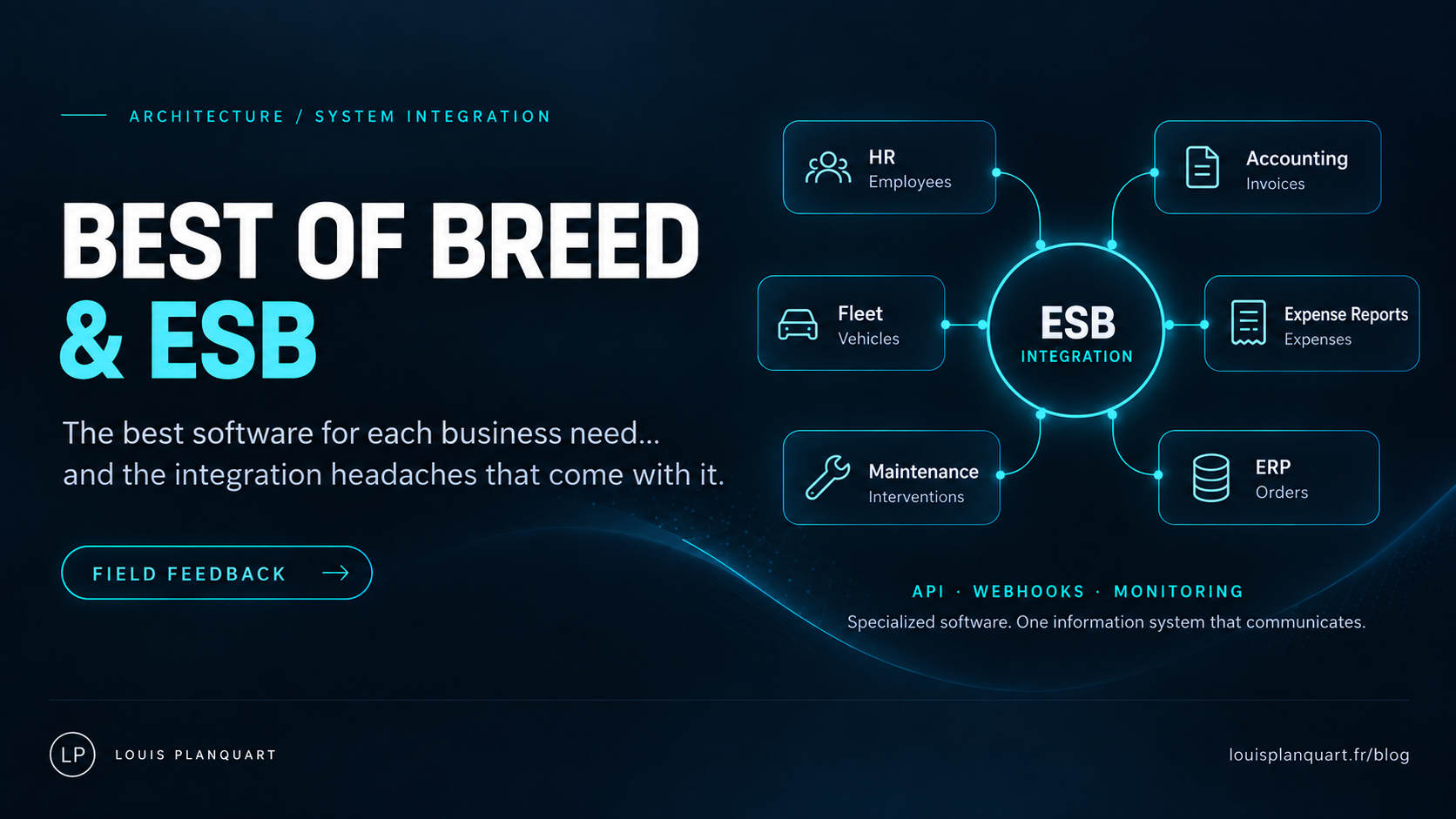
A few years ago, my client decided to fundamentally change its information system. The idea was fairly simple on paper: gradually stop developing our own software and move towards integrating specialised applications. In other words, adopt a Best of Breed approach. The idea behind Best of Breed is not to find one enormous application that does everything moderately well, but to choose the software that best meets the needs of each business function.
The best HR software. The best fleet management application. The best expense management tool. The best accounting software. The best maintenance system. And the best application for some obscure business process that exactly three people in the company understand perfectly. On paper, it is brilliant. At first glance, it probably even looks like the ideal approach for users. Except for one small detail.
All these wonderful applications will need to talk to each other.
And that is usually where the trouble starts.
Figures from my experience with this client: RUN does not include new projects or changes.
01 Best of Breed: great for the business, rather less straightforward for IT
Take a very concrete example: fleet management. You have found an excellent specialist application. The fleet manager loves it. It handles vehicles, fuel cards, contracts, leasing companies, garages, mileage and probably the pressure in the rear-left tyre of Michel’s Clio. Great. Now your fleet manager needs to know who works for the company.
You are hardly going to ask them to manually upload a list of employees every day. They also need information about absences, for example to spot unusual fuel-card use during someone’s holiday. They may need accounting data. The application may itself connect to leasing companies, garages and other service providers. Your supposedly “best software on the market” gradually finds itself in the middle of a spider’s web.
Of course, there is another solution. You can hire people to spend their days entering data. It works. With a few typing mistakes, information updated three days late, Excel files travelling around by email, manual exports and people starting their mornings by importing fifteen CSV files. Personally, that is not my idea of a dream setup.
Especially since your application portfolio is constantly changing. One application arrives, another disappears, a third changes vendor, and a fourth suddenly decides its v1 API is deprecated and you really should move to v3 before Friday. Welcome to Best of Breed.
02 Now we have to get this lot talking
Once the Best of Breed vision was established, we needed a technical solution that would allow all these applications to communicate. That is when we started looking at ESBs. An ESB, or Enterprise Service Bus, is an integration platform that centralises and orchestrates exchanges between different applications. In human language:
It gets some data from somewhere, may transform it, and sends it somewhere else.
Of course, an ESB does much more: orchestration, monitoring, error handling, transformations, connectors, API calls, asynchronous processing and so on. But if you are new to the subject, start with that sentence.
03 Why not build it ourselves?
At the time, we had an internal team of roughly four developers. Technically, nothing prevented us from building our own integration flows. A service written in .NET, Java, Python or any technology the team knew could easily retrieve employees from one application and send them to another. So we did some R&D. And, like any good development team asked whether to buy software or build it ourselves, we had a few particularly calm and measured debates.
Obviously.
But our main concern was not actually implementing the flow.
Building a flow is relatively straightforward. Building one that keeps working for ten years is another matter. When the system fails, you need logs. You need to know which record failed. You need to replay it. You need alerts, emails or notifications. You need monitoring. You need to understand, six months later, why Michel added that improbable condition to the code. Above all, it needs to keep working when Michel resigns, changes departments or retires.
You can develop a flow in three days. Then spend ten years on its MCO—keeping it operational. That is where a specialist solution starts to make real sense: standardising how flows are developed, monitored and maintained. We carried out that study about four years ago. And today I would add an important qualification.
Given how quickly AI-assisted development tools and vibe coding are evolving, I am not sure I would automatically recommend exactly the same architecture if I were starting with a blank sheet now. With a good development team and agents able to analyse code, maintain documentation, generate tests and monitor a modern architecture, building an in-house integration platform becomes an interesting question again. I do not have a definitive answer yet.
But whether you buy an ESB or develop your own platform, the underlying need is still there. You need an integration layer.
04 Our choice: Phoenix by Blueway
Once we had identified the need, we assessed several solutions. We eventually chose Phoenix by Blueway. Blueway has since been acquired by SoftProject. Several things appealed to us at the time. First, its flow-development capabilities. Then how easy it was to get started. But also something that might sound secondary and, with hindsight, really was not: everything happened in the same web interface. We had looked at other solutions with:
- a desktop client for development;
- another interface for deployment;
- a web portal for operations;
- and something else again for administration.
That probably works very well in large organisations. But for an integration team of fewer than five people, it mainly felt as though we would be multiplying tools and therefore complexity. Phoenix seemed much better suited to our team’s size. Budget mattered too, naturally. Because, contrary to what some salespeople apparently believe, not all of us have a lithium mine underneath the IT department.
05 Now you need to turn your developers into integration engineers
This is where a particularly entertaining phase begins. You have to explain to your developers that they are now integration engineers. They will move from their favourite IDE to some kind of low-code interface. And they will probably find it utterly revolting. That is normal. They are moving from almost total freedom to clicking buttons. Before:
“I’ll write a loop, a class, two functions, a little intermediate object and solve this exactly the way I want.”
Now:
“What do you mean, your thing only has a WHILE loop?”
You will observe several stages. Denial. Anger. Bargaining. The urge to rewrite the ESB themselves during lunch. Potentially a few resignations. In a way, that frustration is rather a good sign. It means you have real developers who enjoy their work. What they feel is a bit like a bird you have just put in a cage.
“Why am I no longer allowed to do what I want?”
Then they put their first flow into production. Six months later, they realise that, provided their analysis and design were not too bad, they have barely had to touch it. And usually, at that point:
“Well… it’s not that bad after all.”
06 Before integrating anything: change your rules
Once we adopted this approach, we also had to introduce a few rules across the company. If a business department wants to buy new software, it obviously needs to consult IT. Well… in theory. More importantly, we decided that IT needed a real technical veto. An application can be exceptional functionally and a complete disaster to integrate. A user tells you:
“It’s brilliant. It does absolutely everything we need.”
Then you ask:
“Does it have an API?”
Silence.
“An automated export?”
Silence.
“A webhook?”
More silence.
“Technical documentation?”
The salesperson looks at the ceiling. And you gradually realise that their famous “complete integration with your information system” means dropping an Excel file onto an FTP server every Sunday at 2 a.m.
07 Yes, I have developed a slight obsession with APIs
Some people will tell you that flat files work perfectly well. They are right. Others will tell you that SOAP still works. They are right too. Personally, whenever possible, I prefer modern HTTP APIs, generally REST/JSON or OData depending on the application. It is an architectural choice. And probably also a little indulgence on the part of the technician in me.
If I am setting up a new integration, I would rather start with technology that is widely used, documented and easy to work with. That absolutely does not mean REST is magic. Nor does it mean CSV files are necessarily bad.
In any case, you will not escape them. There will always be flat files. SEPA files, for instance. Some banking exchanges. Partners with no other option. Old systems whose server nobody dares touch because rumour has it that somebody restarted it in 2007 and it did not come back for three days. But for business objects such as:
- employees;
- customers;
- suppliers;
- quotations;
- purchase orders;
- invoices;
if a serious API is available, that is naturally what I will favour.
08 Why I prefer real time or near-real time
For a very long time, many interfaces ran overnight. And plenty still do. Processing starts at 1 a.m. Something fails at 2:17. If the original developer did a good job, an alert goes out. Otherwise, at 9:04, an accountant opens a ticket:
“Hello, where have my invoices gone?”
And off we go. Back then, we sometimes also had to work around backup windows, particularly cold database backups. The developer would negotiate a slot with the infrastructure team. Infrastructure would say no. The developer would insist. Infrastructure would still say no. And somewhere in the middle, an invoice was desperately trying to move from one application to another. Today, whenever possible, I much prefer real-time or near-real-time processing. A few seconds. A few minutes.
There are several advantages. The data stays fresh. The load is spread out. Users have continuously updated information. And, crucially, when something goes wrong, your team is probably still in the office. Fixing a problem at 14:32 is rather more pleasant than discovering at 7 a.m. that 60,000 rows failed to load overnight.
09 The 40,000-row file that fails because of a semicolon
File-based processing has another particularly delightful characteristic. You receive 40,000 rows. Of those, 39,999 are perfect. But Gérard has managed to put a semicolon in a description that nobody accounted for. Or an escape character. Or an unclosed XML tag. Or a carriage return nobody understands. And sometimes:
BOOM.
The whole file is rejected. An API architecture that processes individual events generally makes errors much easier to isolate. One record has a problem? That record fails. The others keep moving. Of course, that is not a magical property of APIs: you can perfectly well build a batch API that rejects 10,000 objects because number 8,542 is invalid. But in our architecture, wherever possible, we try to build unit-level flows or provide sufficiently fine-grained error handling.
10 And now: welcome to the world of webhooks
Your former developers, more or less willingly converted into integration engineers, will then need to learn some new vocabulary. Starting with webhooks. A webhook allows one application to automatically notify another when an event occurs. For example, an employee is updated in your HR application. Instead of the ESB asking the API every five minutes:
“Anything new?”
“No.”
“What about now?”
“Still no.”
“And now?”
the HR application calls a URL you supplied:
https://monentreprise.com/webhook
The message might simply say:
“Employee 123456 has been updated.”
Your ESB can receive that information, temporarily put it in a message queue or Data Queue, then perform a GET against the API a few seconds or minutes later to retrieve the complete information. It is extremely useful. And it changes how you think about interfaces.
11 GET, POST, PUT, PATCH, DELETE… welcome to APIs
Your team also needs to master the main HTTP methods.
| Method | Role |
|---|---|
| GET | retrieves a resource. |
| POST | creates one or triggers an action, depending on the API. |
| PUT | replaces or updates a resource. |
| PATCH | performs a partial update. |
| DELETE | … |
Well, the name probably gives you a clue for that one. Then you discover that API theory and API reality are two different worlds. Some vendors have designed things intelligently. Others, rather less so. To change a piece of data, some require you to:
- perform a GET;
- retrieve the entire object;
- change your field;
- send a PATCH.
Others provide an upsert, allowing a single call to create a resource if it does not exist or update it if it does. There are conventions. Best practices. Standards. And then there is whatever the vendor’s developer decided to do on Tuesday morning. You learn to live with both.
12 OAuth and the wonderful world of Bearer Tokens
Your teams will then discover OAuth. Client IDs. Secrets. Scopes. Tokens. Refresh tokens. Bearer Tokens. And occasionally, documentation that spends five pages explaining how to obtain a token without ever really telling you which URL to call. That is part of the job too. And if your team is discovering APIs, give them the right tools.
13 Postman quickly becomes your best friend
A specialist tool is almost indispensable when getting to grips with an API. Personally, I use Postman a lot. There are alternatives, of course, such as Insomnia, Bruno and Hoppscotch. But Postman is extremely useful during analysis and integration. You can organise calls into folders, create environments, store variables, quickly test a GET, send a POST, edit a payload and work out why your JSON was rejected. Then come back three weeks later and ask yourself:
“Why did I create six versions of this request?”
When selecting a solution, always ask for the API documentation. Ideally, an OpenAPI / Swagger specification. And when a vendor is really organised, it will also provide a document mapping:
- the field name displayed in the user interface;
- its technical name in the API.
It sounds trivial. But when a field labelled “Assigned establishment” in the interface is called org_unit_ref_02 in the API, you will be very glad to have that document.
14 Buying off-the-shelf software also means giving up some customisation
Users have an important transition to make too. If your company’s strategy is to stop building bespoke applications and buy market solutions instead, you have to accept the consequences of that decision. You are buying off-the-shelf software. You are not buying a development team dedicated to your company. During presales, some vendors will naturally offer:
“No problem, we can customise that for you.”
Be careful. That is not necessarily good news. If the solution was designed from the beginning to support clean, maintainable extensions, fine. But if customisation means creating a special branch of the software just for you, you may be building your next industrial-scale disaster.
The vendor wants to sell. That is normal. Everything works at first. Then the next release arrives, and suddenly your custom development is no longer compatible. Or the team that developed it has left. Or nobody knows why that branch exists. Meanwhile, IT has let users believe they can keep exactly the same degree of bespoke functionality as before. That does not add up. At some point, part of the CIO’s role is to uphold the vision:
We decided to buy standard software, and that sometimes means adapting our processes slightly to the software.
Otherwise, we might as well keep building it ourselves.
15 The first real project: time for three-cushion billiards
Right. You have chosen your ESB. You have chosen your new application. The project begins. A user comes to you:
“I need the purchase orders in the application.”
Easy. Of course. You take the data from there and put it here. Simple, right? So you open the API documentation. First question:
Is there even an endpoint for creating a purchase order?
Yes. Victory. Second question:
Which data does the user actually need?
The order number. The supplier. The lines. The amount. The worksite. The establishment. The buyer. The contract. The finance director’s favourite colour. You get the idea. You make the list. Then you return to the API documentation and discover that three fields are unavailable. Or that a field exists but is read-only. Or that it exists in the interface but not in the API. Welcome.
16 This is where the real integration questions begin
You have to check field lengths. Your ERP may allow 100 characters. The target application allows 50. Fine. Who decides what gets cut? You need to load reference data. Your purchase order references an establishment, and the target application does not yet know that establishment. Then the establishment references a company. And that company needs to exist first. Gradually, you discover a fundamental concept in an integrated information system:
Which system is the master for which data?
And, consequently:
Which system is the slave?
That is when the diagrams begin. Because keeping the whole information system in your head eventually gets a little complicated.
17 And naturally, the dates use different formats
You open Postman. You try your first insertion. Error. You try again. Error. You inspect the payload and discover that your ERP supplies:
18/09/2026
while the API expects:
2026-09-18T00:00:00Z
Great. Nobody showed you how to transform a date during your ESB training. And that is the exact moment you realise that:
“You just take the data from there and put it here.”
may have been a slight oversimplification. You are in deep shit. But above all: do not get discouraged. This is completely normal. You are probably learning all of the following at once:
- a new ESB;
- a new business application;
- its APIs;
- sometimes an entirely new business domain.
That is a lot.
18 Your developers suddenly spend a lot of time on the phone
You will also discover a rather unexpected change in the job. Previously, the developer had a requirement and wrote the code. Now your integration engineer spends the day between:
- the business user;
- the application project manager;
- the vendor’s developer;
- the ESB support team;
- sometimes the infrastructure team;
- and their own thoughts about why they did not open a bakery instead.
To move forward, they constantly need answers. That is where you will probably discover how useful an AMOA, or business-side requirements specialist, can be. Somebody needs to filter, clarify and structure user requirements so that your integration engineer does not spend 50% of their time arranging meetings.
19 The three-day flow takes three weeks
Prepare for this too. On paper:
“The flow? Three days.”
Technically, that may have been true. Three days of development. Except that, between those three days:
- you are waiting for a business answer;
- the vendor has something to check;
- an API endpoint is missing;
- the user changes the requirement slightly;
- some reference data needs creating;
- the project manager is on holiday;
- somebody needs to open a firewall;
- the vendor’s developer is not available until next Tuesday.
20 Sometimes presales and the actual API live in different universes
During presales:
“Don’t worry, our API can do everything.”
Three months later:
“Well, actually, that endpoint is only available to our internal mobile application.”
Great. You start digging through the documentation with the vendor. Then gradually discover that nobody there has really used certain endpoints. Sometimes you get the strange feeling that you are beta-testing the API of a SaaS product you are paying for. You are simultaneously:
- the customer;
- the integrator;
- the tester;
- almost the vendor’s technical consultant.
And naturally, at the end of the month, the licence invoice arrives exactly on time. You feel a bit like the one being taken for a ride. An interesting sensation.
21 After a few years, you choose software very differently
Over time, we changed how we approach new projects. Today, from the presales stage, I want to know:
Do you have an API?
Then:
Show me the documentation.
Then:
Is the entire functional scope available through the API?
Then:
How many of your customers actually use it?
That last question matters. There is a considerable difference between:
“Yes, we have an API.”
and:
“Three hundred customers use our API every day to synchronise their information systems.”
I also try to speak to someone technical at the vendor as early as possible. Not just the salesperson. Not just the project manager. Someone who can open Swagger and talk to the integration engineer. That can save several months of suffering.
22 Document it. Draw diagrams. Map your fields.
This is probably one of the most important pieces of advice I can offer. Document your flows. Draw diagrams. Clearly identify:
- the master system;
- the target system;
- the trigger;
- the exchanged data;
- the transformations;
- the required reference data;
- the API endpoints;
- the possible errors.
Above all:
Map your fields.
Source field. Target field. Type. Length. Transformation. Mandatory value. Default value. It may seem time-consuming at first. But six months later, when somebody asks why the worksite code is sent in ContractId, you will be glad you have the mapping.
23 Think of interfaces as half-flows
This is something we learned gradually, and it becomes extremely powerful as an information system grows. Avoid thinking only in terms of:
Application A → Application B
Instead, think in half-flows. For example:
ERP → Normalised purchase order inside the ESB
then:
Normalised purchase order → Application B
You now have a clean “purchase order” object in your integration layer. Tomorrow, application C arrives and also needs purchase orders. You do not need to rewrite the entire extraction from the ERP. You simply develop:
Normalised purchase order → Application C
Then application D arrives. Same thing. That is when you gradually start to understand why the ESB is useful. The data is retrieved once from the master system. It is transformed once into a format you control. Then it can travel to N applications. You gradually stop copying and pasting obscure code to retrieve the same information over and over. And your information system starts becoming a genuine integration architecture.
24 Then webhooks and message queues start accelerating the whole system
Now add webhooks. Your ERP updates a purchase order. An event is sent. It reaches the ESB. You may store it in a queue for a few seconds. Your flow retrieves the data, updates the internal object and feeds the subscribing systems. A few seconds or minutes after the change:
The data is everywhere.
At that point, something starts changing within the company. Users gradually stop asking:
“When does the interface run?”
Because the interface runs all the time.
25 And suddenly life becomes almost pleasant
Data flows.
Monitoring is centralised.
When a flow fails, you see it.
You can intervene during the day.
Your integration engineers are no longer maintaining 150 programs written in twelve different technologies.
The data is fresh.
The business is happy.
The accountant who has not spoken to you in three years starts asking how your holiday went.
You sleep better.
Unicorns appear in the sky.
You start wondering whether somebody put something in your coffee.
And ultimately, that is exactly what we were looking for at the start of the journey.
26 So, do I recommend Best of Breed?
Yes… but not merely because it lets you buy better software. Best of Breed changes your information system far more deeply. It changes your architecture, your teams, the work your developers do, how you select software, the relationship between IT and the business, and how you think about data. Above all, it forces you to treat integration as a genuine internal product, not a piece of code a developer squeezes in between two tickets.
You need patience. You need to accept mistakes, draw lots of diagrams, learn APIs, challenge vendors, document and monitor. At the beginning, there will probably be moments when you seriously wonder why you started this at all. But once the first foundations are in place, things begin to accelerate. Each new flow benefits from earlier work. Each new integration adds to your assets. Each properly normalised business object can be reused.
Gradually, your information system stops being a collection of independent applications.
It becomes an actual system.
And ultimately, that is probably the most interesting part of a Best of Breed approach.
Additional source and scope of this field report
The examples, architectural decisions and operational figures in this article come from my experience with this client. They are not a performance promise for every information system. The figure of 40,000 flows per day retains the terminology used in that field report.
Blueway — announcement of its acquisition by SoftProject
This source documents the acquisition; it does not substantiate the figures from my own operation.

Comments
0 commentsNo published comments yet. Be the first to respond.